Warehouse & racking moduleGoods in → Stock on hand · Stock takes
Stock on hand opens on the question a food warehouse asks first: what is about to go out of date. The headline is how many cases are within seven days of their use-by, and how many of those are due today or tomorrow, out of everything on hand and the slots it is in.
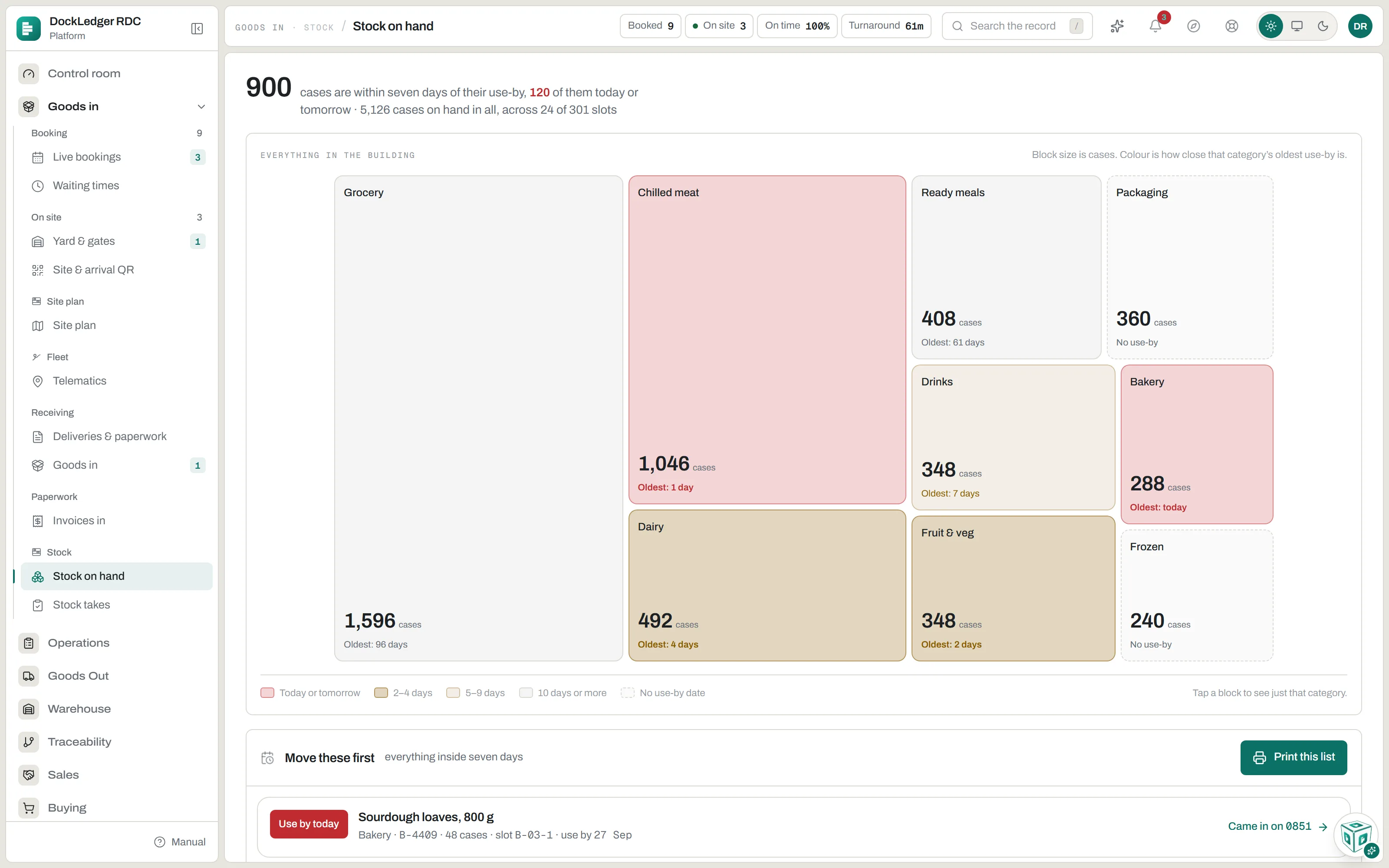
Under it, Everything in the building draws each category as a block sized by cases and coloured by how close its oldest use-by is, from today or tomorrow to ten days or more, with stock that carries no date left plain. Tap a block to see just that category. Move these first lists every batch with seven days or fewer left, soonest first, with its slot and the delivery it came in on, and prints as a sheet for the floor. A batch with no slot on that list has been received and not put away yet.
Every product line
Further down, every product with stock: on hand, allocated to live pick lists, and free. A line that owes more than it holds shows as short. Search by SKU, product name or slot label. Open a line for Where is it: every slot the product is in, the pallets in each, what live pick lists still owe against it, any requests to bring it down to a face, and the last things that moved it and who did. Where is it has its own search, which also takes a pallet plate or a slot code, and so does the search box at the top of every console screen.
- Remove stock. Taking cases off the books outside of a pick, a crushed pallet for instance, is done from the stock line or the slot, with the number of cases, a reason and an optional note. It is recorded against your name and cannot be undone.
- Stock removed. The audit trail of every one of those removals, with who, when and why, exportable as CSV. It is what a stock take is reconciled against.
- Nothing here puts stock on. Stock only arrives through goods in and a put-away, so the figure on the screen is the one the floor made.
Products and barcodes
Stock is counted against a product, so the catalogue comes first. It lives under Warehouse → Products: a product needs a code and a description, so 5012345678900 reads as what it actually is, and everything else can follow. Each product is scored on six fields, and the screen ranks the gaps by what a blank one breaks: red stops the floor today, amber breaks a record you will need later. Case quantity and weight are kept on the product. Bring in the spreadsheet you already have as a CSV: it shows what it will add and update before it does, and a code already on file is updated rather than added twice. Adding or changing a product is an owner or manager job.
Warehouse → Barcodes is the map the guns resolve against. Every code the building has seen appears there, mapped or not, and a code that matches nothing is the one to fix before the next vehicle brings another. Set how many units one beep is worth, 12 for a case of twelve, and the floor stops counting by hand. The same screen prints blank pallet plates.
Rotation
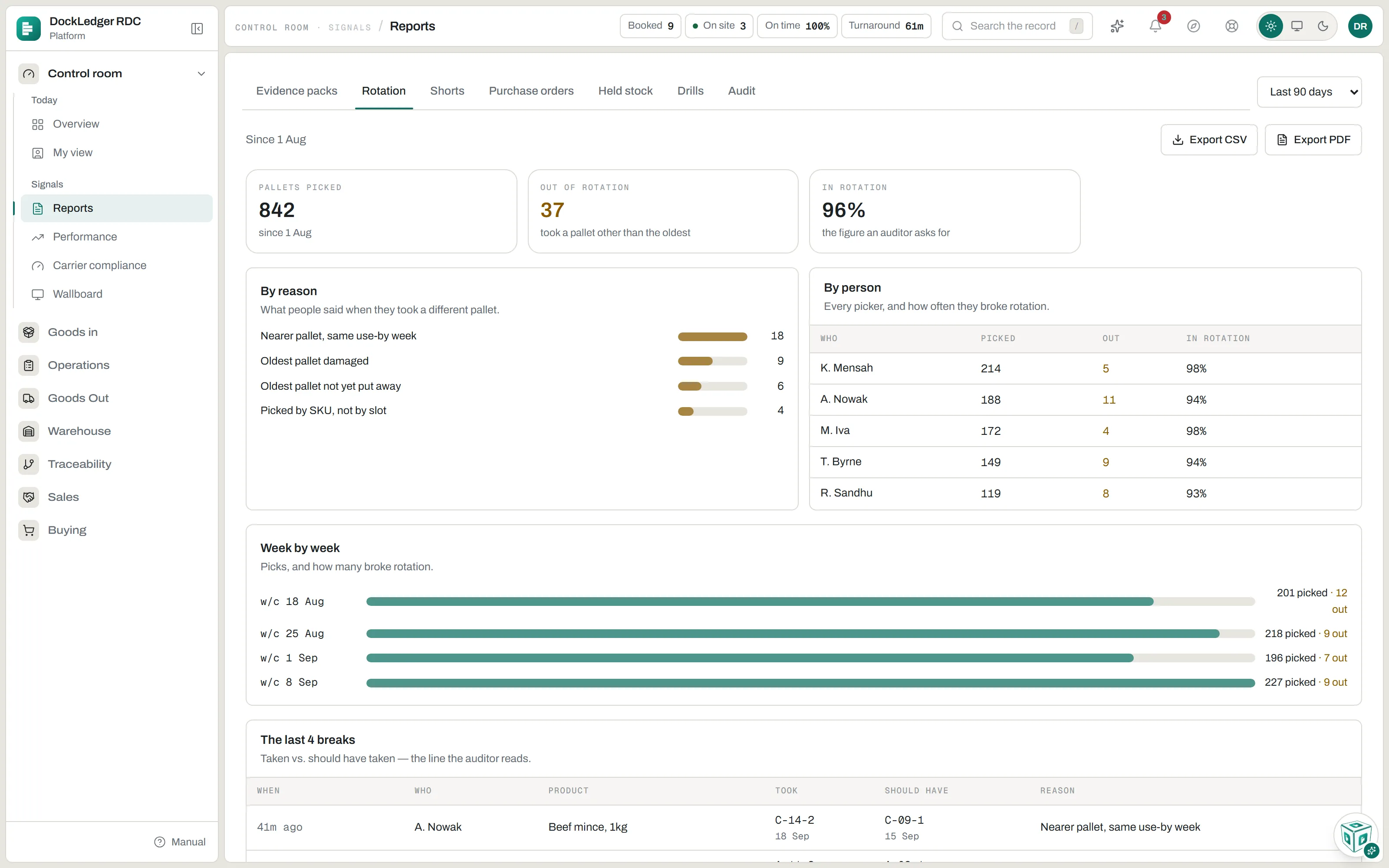
Every time a pallet is taken for a pick face and it is not the oldest, the reach truck asks why. Reports → Rotation adds those up: pallets picked, how many were out of rotation, the share in rotation, the reasons people gave, each person’s own figure, week by week, and the last breaks with what was taken against what should have been. It exports as CSV or PDF. It is the page an auditor asks for.
Stock takes: the floor counts, the office watches
Start a count from Stock takes. Give it a name and choose what it covers: Pick faces is every active picking location plus any reserve slot already holding more than it should, and Whole site is every active location. One count can be open at a time. Starting and closing a count is office work; a checker login cannot do either.
Whoever is counting opens dockledger.app/count on a gun or a phone and signs in with their floor username. The count is blind on purpose: each slot shows which products should be in it, never how many, and the counter types what is actually on the shelf. Zero is an answer too. A slot that should be empty still gets counted.
In the office the count fills in as it happens: how much is done, and a list of what disagrees, biggest difference first, with who counted it. When you close the count, every slot counted lower than the ledger is written down as a miscount, with the count’s name in the note, and the screen tells you how many before you press. A slot counted higher is left as it is: stock only comes on through goods in or a put-away, never through a count. Pick faces are where the scope earns its keep. Reserve stock behind a scan trail rarely drifts, but a face is touched dozens of times a day, and that is where mistakes show up first.
Where this fits: Warehouse management for food