Every planControl room → My view · Reports
My view: the three things you check first
My view is your own page under Control room. Most people only care about two or three things first thing in the morning, so that is what it is for: tick them once and they are waiting every time you open it, with nothing else on the page.
The first time, it is empty and offers Start with today’s exceptions as a single tap. Otherwise open the list underneath and tick what your job needs. The panels are grouped the way the console is: Mine, Dock, Buying, Orders, Warehouse and Systems. Among them: today’s exceptions, my carriers, waiting over an hour, the goods-in queue, bays free, next vehicles due, on site now, late today, slots to approve, no-shows and short deliveries over seven days, purchase orders the supplier has not confirmed or has not booked a delivery for, orders to confirm, orders to pick and load, picks in progress, rotation over 30 days, stock expiring within seven days, what is in quarantine, integrations failing and unread notifications.
- Panels are grouped the same way as the list (Mine, Dock and so on). Inside each group they sit in the order you ticked them: the counts as a short list, with the panels that show rows as cards underneath.
- Each one opens the screen behind its number. Amber means it wants a look.
- The figures refresh every minute on their own. Refresh reads them again now, for when somebody has just signed a lorry in on the radio.
- Every tick saves itself in this browser straight away. Save my view also writes it to your account, so it follows you to another computer.
Named views: a board you lay out yourself
Across the top of My view is a strip: My view first, then any views you have made, then a plus. Press the plus, give the view a name, and choose what it starts from:
- A starter for your job, already chosen for you. Owners and managers get Morning brief (exceptions, next up, late today, slots to approve, unconfirmed purchase orders, bays); the office gets Office desk (slots to approve, next up, purchase orders with nothing booked, orders to confirm, exceptions, unread); a checker gets Floor (the goods-in queue, bays, waiting, picks, short-dated and quarantine).
- A copy of My view, carrying across the panels you already ticked.
- Blank, for when you know exactly what you want.
A named view is a free board. Drag a panel by its header, size it from its bottom-right corner, and whatever it is pushed against moves out of the way. The layout saves itself when you let go. Add a tool opens the list from the side, with today’s figure beside each one, and stays open so you can add a second. If you work from the keyboard, Arrange does the same moves: Tab to a panel, arrows move it, Shift and the arrows size it, Enter keeps, Escape puts it back. On a phone the board becomes a simple list in reading order.
The view you are on has a menu to rename, duplicate, move it left or right, or delete it (it asks first). My view itself cannot be renamed or deleted. Views are kept per person and per site, so your arrangement is yours alone, and a checker is never offered the office-only counts.
Reports
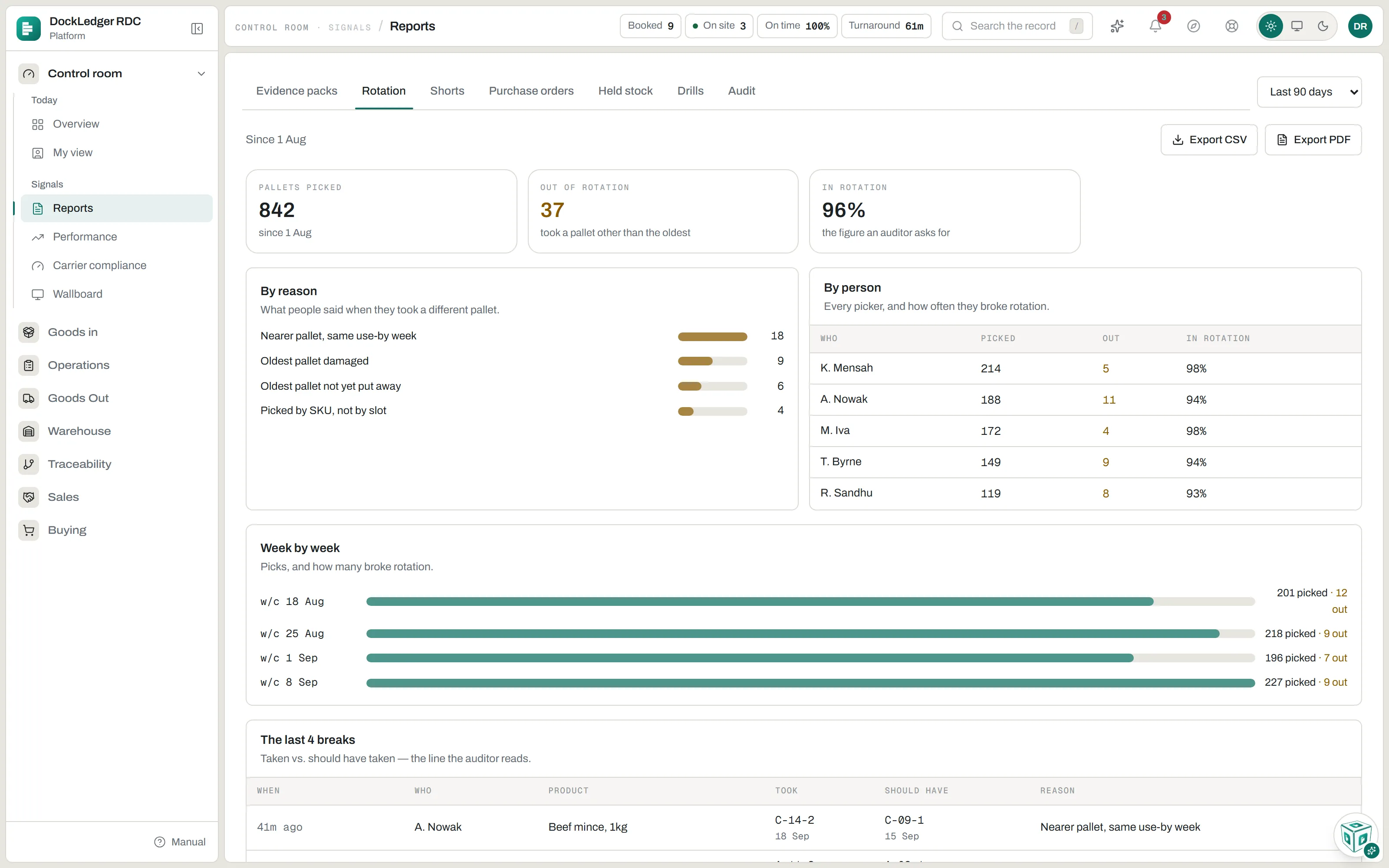
Reports, also under Control room, has seven tabs. Rotation, Shorts and Purchase orders share a period at the top right: the last 30, 90 or 180 days, or the last year (90 days unless you change it). The report tabs carry Export CSV and Export PDF, built from exactly what is on the screen at the time.
- Evidence packs. For when somebody has asked you for proof: a waiting-time pack for a demurrage query, carrier performance for a rate review, and goods-in discrepancies for a supplier. Each card says who usually asks for it, the period, and whether anything behind it is still open, so you close the gap before you send it. The recall drill certificate and the proof-of-delivery bundle have no button here: a drill’s record prints from Traceability or the Drills tab, and the bundle lists its sheets on the card, each one opening its own pack.
- Rotation. Pallets picked, how many broke first-expired-first-out, the reasons people gave, who, week by week, and the most recent breaks with the pallet taken against the one that should have been. The in-rotation figure is the one an auditor asks for.
- Shorts. Two directions kept apart: what arrived short of what the supplier declared, by supplier, and what left short of what the customer ordered, by customer.
- Purchase orders. Per supplier: orders, how many landed, how often they confirmed on the portal, how often the lorry came on the promised day, and cases received against cases ordered.
- Held stock. Everything that cannot be picked right now and why: held by a person, held by the nightly date check, or from a held or recalled batch, with who held it and since when. Excursions shows only the pallets a temperature reading put on hold. An owner or manager can release a held pallet from here; a batch hold is released on Traceability.
- Drills. Every traceability drill this workspace has run, newest first, with how long it took and whether its weight balanced. Nobody can edit a drill record, and Print on a row reprints it exactly as it was on the day.
- Audit. Pick the window (the last twelve months unless you change it) and press Generate: one pack for a BRCGS, SALSA or Red Tractor audit, with the drills, recall tests, holds and releases, what is on hold now, labels and pallet codes, quarantine, temperature readings, supplier claims and the audit trail. It lists its own gaps at the top. Owners, managers and office staff can generate it.
When the auditor is on the floor