Meat traceability module/station · £89 a month per bench
The bench station is the cutting room’s weighing bench: a PC at one bench with a serial scale, a USB barcode scanner and a thermal label printer, open at dockledger.app/station. It takes one box at a time, and every pack that comes off it is weighed on the scale and keeps its own real weight. Nothing is averaged. When the run is recorded, each pack’s label prints with its exact weight and its own code.
Opening a bench
A bench is a machine rather than a person, so it signs in with a station key instead of a name. Generate one on Plan & billing, under the registered benches. It is shown once: write it down or type it into the bench straight away. On the bench, choose the Station key tab on the sign-in screen, type the key (it starts DLS) and press Open this bench. The machine stays signed in after that. A lost key is revoked and a new one generated; it is never shown again.
A run at the bench
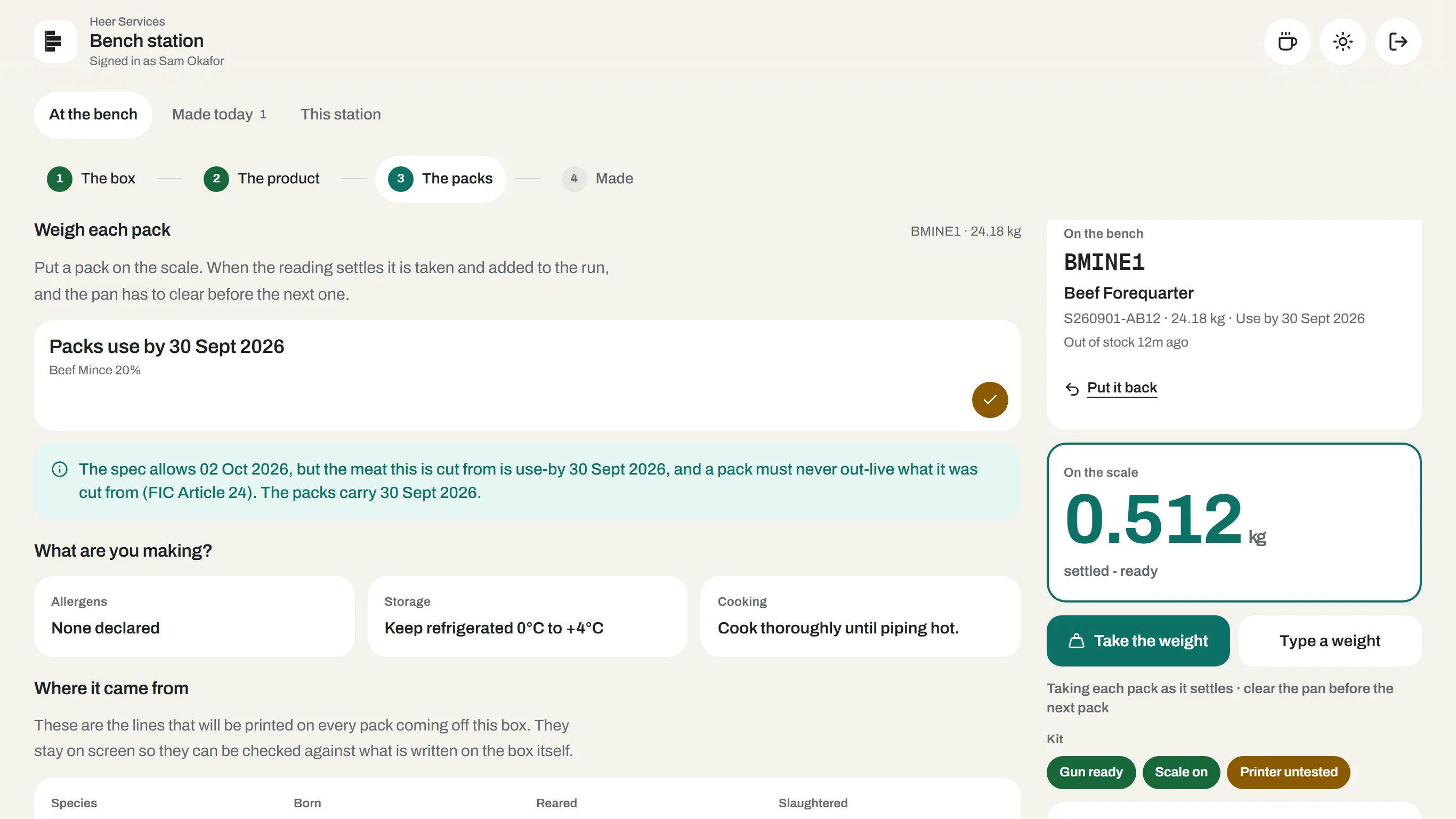
- The box. Scan the box off the rack. Point the gun anywhere on the page; there is nothing to click into first. The box comes out of stock and onto the bench, with where it came from on screen so it can be checked against the box itself. The bench takes one box at a time: finish it, or put it back, before scanning another.
- The product. Tap what you are making. The use-by, allergens, storage and cooking all come off the spec the office signed off; none of it is typed at the bench.
- The packs. Put a pack on the scale. When the reading settles it is taken and added to the run, and the pan has to clear before the next one, so a pack left on the scale never counts twice. The running total and yield stay on screen, and a pack that would take the total past what went in is refused. Take the weight does it by hand; Type a weight is for a pack weighed elsewhere, or a bench with no scale.
- Made. Press Finish and record. The office system issues the batch and one code per pack, and the labels print as soon as they come back (or press Print, if you have switched that off under This station). Print them again if one jammed, or reprint a single pack.
Labels print on your retail pack template from Labels & design. If you have not designed one yet, they print on DockLedger’s own layout and the screen says so. The labels go through the browser’s print dialog, one label per job at the template’s size, so a thermal printer with a Windows driver feeds exactly one. For a Zebra, the same labels are offered as ZPL: download the file or copy the text. Nothing prints without a real weight and a real code.
If the network drops as you finish, the record waits safely on the station and sends itself. There is nothing to print until the codes come back, and the screen says so. Made today lists what this bench has made.
This station: connecting the kit
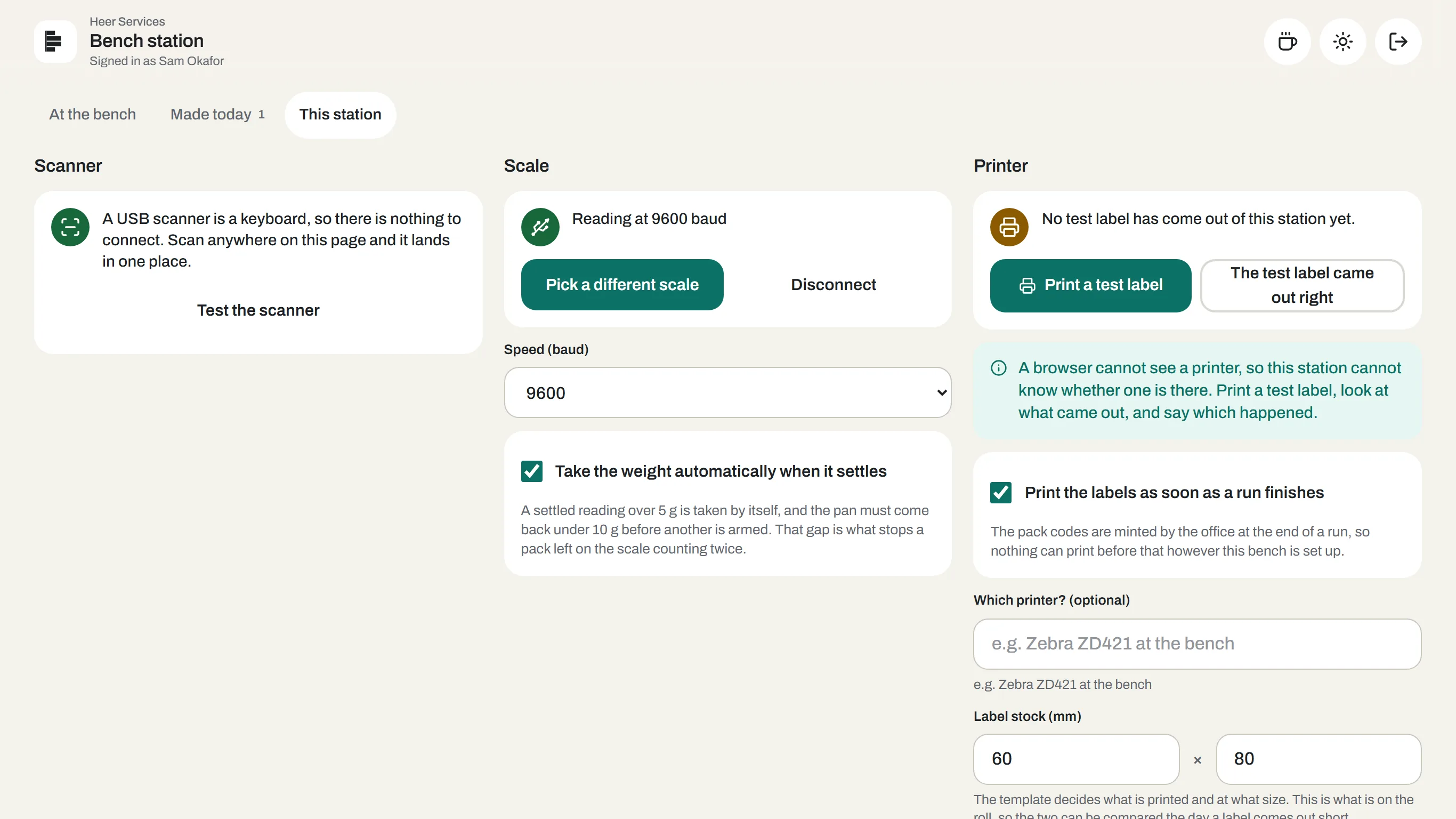
- Scanner. A USB scanner types like a keyboard, so there is nothing to connect. Test the scanner shows what it read; if nothing arrives, check it is set to send Enter after a scan.
- Scale. Press Connect a scale and pick its port; the station remembers it, even through a reboot. Set the speed (baud) to match the scale. A&D, Mettler Toledo and most bench scales that send their reading over USB or RS-232 are understood. This needs Chrome or Edge on Windows, macOS or Linux; in any other browser the bench types its weights instead. Take the weight automatically when it settles is on by default and can be switched off.
- Printer. A browser cannot see a printer, so the station asks you to print a test label, look at it, and say whether it came out right. Until someone does, the printer chip reads Printer untested. You can note which printer and the label stock on the roll, and choose to print the labels as soon as a run finishes.
- Name. Give the station a name, such as Bench 2 mince. It shows on the console.
- Demo mode pretends there is a scale, so a whole run can be shown on a laptop. Every screen is badged Demo for as long as it is on. Turn it off before the bench does real work.
Licences are per bench, not per person
Where this fits: BRCGS traceability software